digital safe specialist

Why Buying a Digital Safe from a Trusted Security Specialist Matters

Buying a digital safe is an important security decision. Many customers begin by comparing prices, but the lowest-priced safe may not always be the right choice for their home, office or business.

digital safe specialist

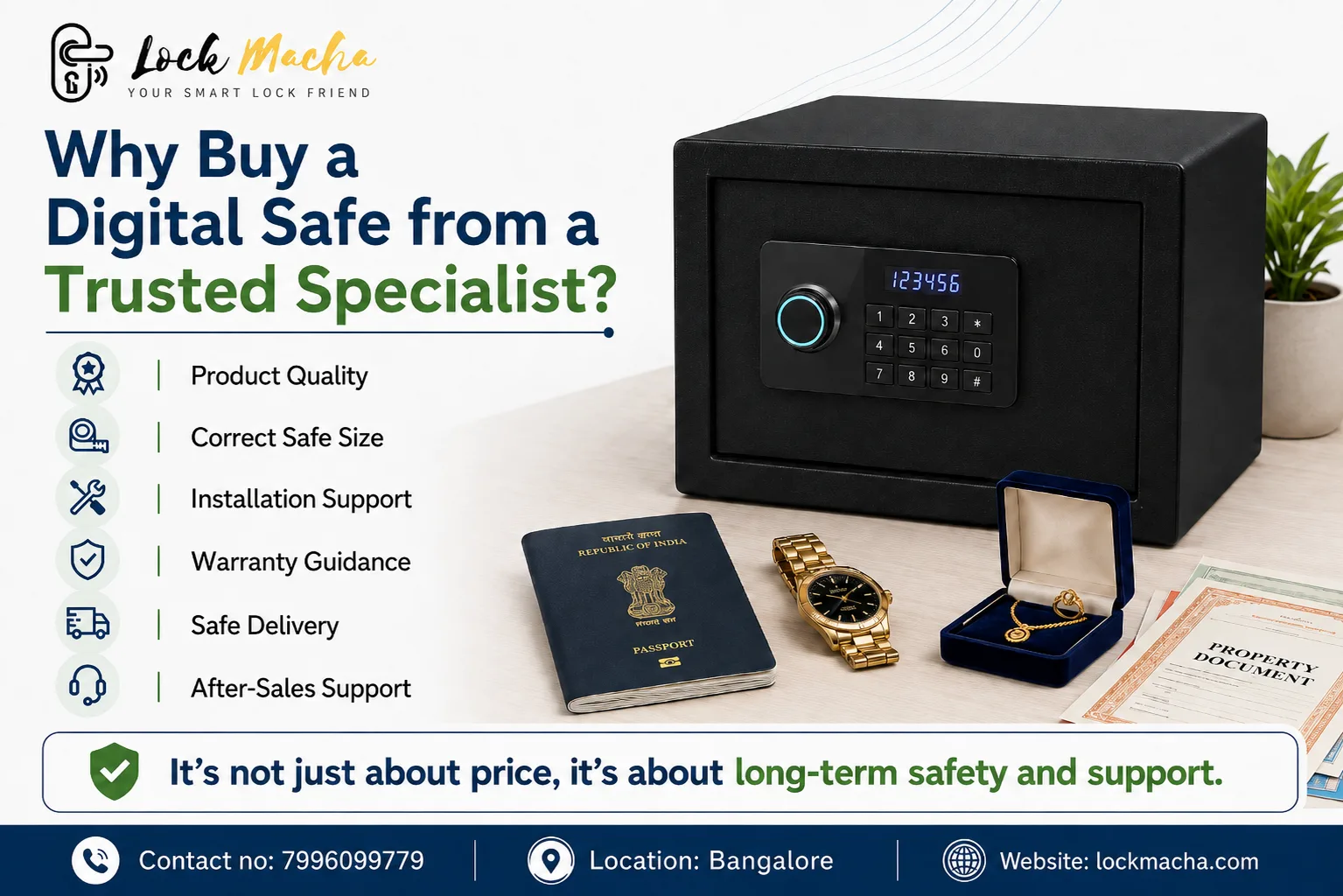
A digital safe should be selected based on product quality, internal capacity, installation requirements, warranty coverage, delivery conditions and after-sales assistance. A trusted digital safe specialist can help you understand these factors before you place an order.

At Lock Macha, we help customers choose suitable digital safes by checking their storage needs, available installation space, preferred access method and delivery conditions.

Before buying a digital safe, check:

  • The quality and authenticity of the product
  • Internal and external safe dimensions
  • The valuables you plan to store
  • Installation and anchoring requirements
  • Delivery access to your property
  • Warranty terms
  • Availability of after-sales support
  • Whether a site inspection is required

Choosing the correct safe is not only about finding a good price. It is about selecting a product that suits your space, storage requirement and security expectations.

What Is a Trusted Digital Safe Specialist?

A trusted digital safe specialist does more than simply sell a safe locker.

The specialist should first understand your requirement and guide you towards a suitable product. This may include helping you compare safe sizes, access systems, installation options and warranty conditions.

A reliable security specialist should help you understand:

  • Which safe size is suitable
  • Whether the safe is intended for home or office use
  • The internal storage capacity
  • The type of locking system
  • Whether wall or floor anchoring is possible
  • Delivery and handling requirements
  • Manufacturer warranty conditions
  • Installation and after-sales support

This guidance becomes especially important when customers are buying a digital safe online without physically inspecting the product.

Why Price Should Not Be the Only Factor

Price is an important consideration, but it should not be the only deciding factor when choosing a digital safe.

Two safes that look similar online may have different:

  • Construction quality
  • Internal storage space
  • Locking systems
  • Emergency-access options
  • Warranty coverage
  • Installation requirements
  • Service availability
  • Product weight
  • Security features

A lower-priced safe may be suitable for basic storage, while another model may offer better capacity, stronger construction or more convenient access features.

The right choice depends on what you want to store and how you plan to use the safe.

Why Product Quality Matters

A digital safe is commonly used to store jewellery, cash, passports, property papers, certificates, electronic devices and confidential documents.

Because these items are valuable, customers should choose a genuine digital safe from a recognised manufacturer or trusted supplier.

Important product-quality factors include:

Strong Construction

The body and door construction should be suitable for the intended use. Different safes provide different levels of protection, so customers should review the product specifications carefully.

Reliable Locking System

Digital safes may operate using:

  • PIN codes
  • Fingerprint access
  • Electronic keypads
  • RFID access
  • Mechanical emergency keys
  • Electronic override systems

The available access options depend on the safe model.

Emergency Access

Customers should understand what happens if the battery runs out, the PIN is forgotten or the electronic system requires support.

Some models may include emergency keys, external battery terminals or other override options.

Genuine Product Documentation

A genuine digital safe should normally be supplied with:

  • A proper invoice
  • User instructions
  • Warranty details
  • Emergency-access information
  • Product documentation

Customers should keep all documents and emergency keys in a secure location outside the safe.

How to Choose the Correct Safe Size

Choosing the correct safe size is one of the most important parts of the digital safe buying process.

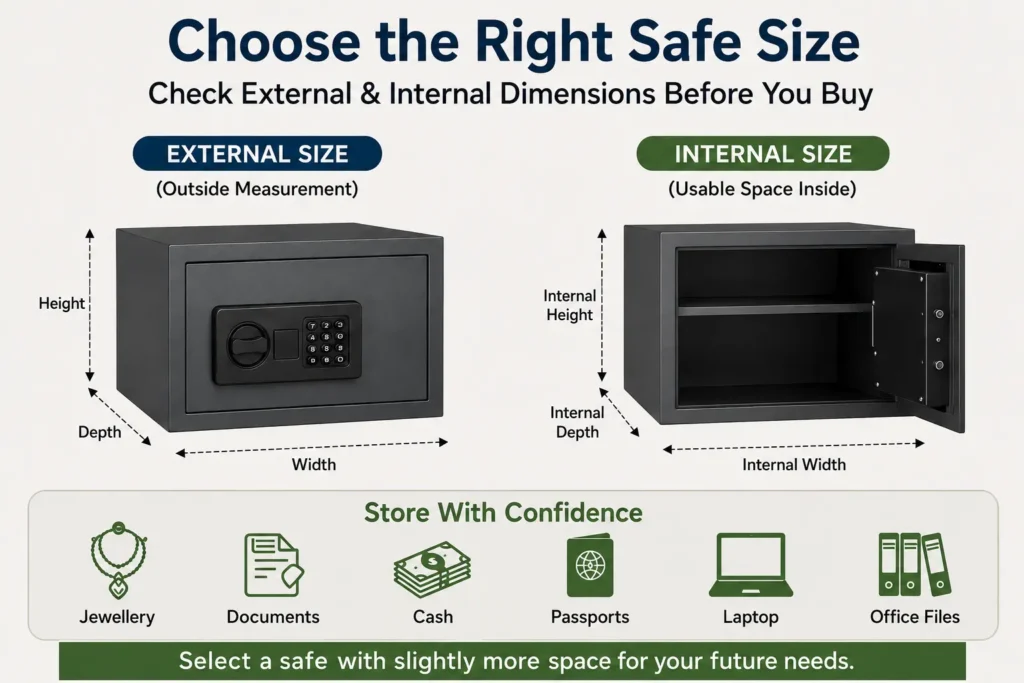
Customers often focus only on the outside dimensions. However, external dimensions and internal usable space are not the same.

The safe door, locking mechanism, shelves and internal construction can reduce the available storage area.

Before choosing a safe, consider:

  • External width, height and depth
  • Internal width, height and depth
  • Shelf position
  • Door-opening clearance
  • Space needed around the safe
  • The size of the items being stored
  • Future storage requirements

For example, a compact safe may be suitable for passports, jewellery and small documents. A larger safe may be needed for files, laptops, business records or multiple jewellery boxes.

Where possible, select a safe with slightly more capacity than your current requirement. This gives you room for future valuables and documents.
digital safe specialist

What Can Be Stored in a Digital Safe?

A digital safe for home may be used to store:

  • Jewellery
  • Passports
  • Property documents
  • Insurance papers
  • Certificates
  • Emergency cash
  • Small electronic devices
  • Important keys
  • Personal records

A digital safe for office may be used to store:

  • Business documents
  • Cash collections
  • Agreements
  • Confidential files
  • Employee records
  • Client documents
  • Hard drives
  • Data-storage devices
  • Office keys

The safe you choose should match the size and type of the items you plan to store.

Digital Safe for Home vs Digital Safe for Office

A safe for home and a safe for office may serve different purposes.

Digital Safe for Home

A home safe is usually selected for personal valuables and important family documents.

Common requirements include:

  • Easy access for authorised family members
  • Compact or medium-sized storage
  • Jewellery and document organisation
  • Placement inside a wardrobe or cabinet
  • Floor or wall anchoring
  • Fingerprint or PIN access

Digital Safe for Office

An office safe may need to handle more frequent access or larger storage requirements.

Common requirements include:

  • Storage for cash or documents
  • Access for selected employees
  • Audit-friendly key or code control
  • Larger internal capacity
  • Strong installation support
  • Commercial delivery planning
  • After-sales assistance

A digital safe specialist can help determine whether a home model or office-focused model is more suitable.

Why Safe Placement Matters

Even a good digital safe should be placed correctly.

The installation location affects convenience, accessibility and the ability to anchor the safe securely.

Possible locations include:

  • Inside a wardrobe
  • Inside customised furniture
  • On a reinforced shelf
  • Against a wall
  • On a suitable floor surface
  • Inside a private office
  • In a storage or records room
  • In a concealed area

Before finalising the location, check:

  • Available width
  • Available height
  • Available depth
  • Door-opening space
  • Floor strength
  • Wall condition
  • Moisture exposure
  • Nearby electrical points, where required
  • Accessibility for delivery and installation

The safe door should be able to open fully without hitting a wardrobe door, wall, drawer or nearby furniture.

Why Safe Installation Support Is Important

Safe installation is not the same for every model.

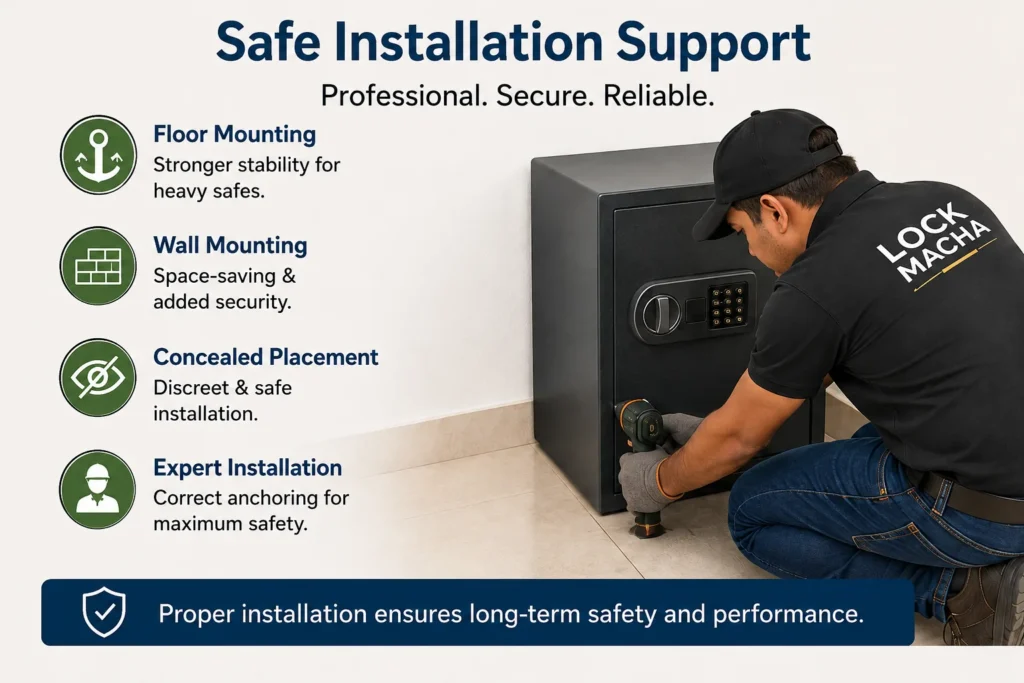
Some digital safes are designed to be anchored to a wall, while others may be fixed to the floor. Larger safes may require special handling or professional installation.

Installation support may include:

  • Checking the proposed location
  • Confirming wall or floor suitability
  • Marking anchor points
  • Drilling and fixing
  • Positioning the safe
  • Checking door movement
  • Demonstrating basic operation
  • Explaining battery replacement
  • Helping with PIN or fingerprint setup

Installation requirements depend on the model, safe weight, site condition and manufacturer recommendations.

Customers should not assume that every wall, cabinet or floor surface is suitable for anchoring.

When Is a Site Inspection Required?

A physical site inspection is not necessary for every digital safe purchase.

In many cases, the basic requirement can be checked using clear photos, measurements and a phone consultation.

However, a site inspection may be recommended when:

  • The safe is large or very heavy
  • Lift access is not available
  • The staircase is narrow
  • The installation area is difficult to access
  • Floor or wall anchoring is required
  • The safe must be placed inside customised furniture
  • The proposed location has limited clearance
  • Concealed placement is required
  • Multiple safes are being installed
  • The site is commercial
  • The strength of the installation surface is unclear
  • Entry doors or passages are narrow

A site inspection can reduce the risk of delivery delays, unsuitable placement or installation complications.
digital safe specialist

Send Photos and Measurements Before Buying

Before purchasing a digital safe, customers can send clear photos and measurements of the proposed safe area.

Please share:

  • One front photo of the area
  • One side-angle photo
  • Available width
  • Available height
  • Available depth
  • Entry-door width
  • Floor number
  • Lift availability
  • Staircase details
  • Preferred safe size
  • Items you plan to store

These details help the Lock Macha team understand whether the selected safe can fit into the available space.

Enquiry CTA

Send us photos of your proposed safe-locker area from the front and side, along with the available width, height and depth. Our team will help check space and installation compatibility.

Why Digital Safe Delivery Planning Matters

Digital safes can be heavy and may require careful transportation.

Before dispatch, customers should confirm:

  • Delivery address
  • Floor number
  • Lift availability
  • Lift size
  • Staircase width
  • Entry-door width
  • Passage width
  • Parking and unloading access
  • Whether extra handling is required

A safe may fit inside the room but still be difficult to move through a narrow door, staircase or corridor.

Large or heavy models may require additional manpower, equipment or delivery coordination.

Providing access details before dispatch helps avoid delays and unexpected handling issues.

Check the Product at the Time of Delivery

When the digital safe is delivered, check:

  • Outer packaging condition
  • Product finish
  • Visible damage
  • Door alignment
  • Accessories
  • Emergency keys
  • User manual
  • Invoice
  • Warranty information

Any visible transit damage should be reported immediately according to the seller’s and manufacturer’s process.

Do not discard the packaging until the product has been checked and the installation process is completed.

Understanding Digital Safe Warranty

Warranty is another important factor when buying a digital safe.

Warranty terms can differ between brands and models. Customers should confirm the conditions before purchasing.

Check:

  • Warranty duration
  • Parts covered
  • Electronic components covered
  • Locking-system coverage
  • Battery exclusions
  • Installation conditions
  • Invoice requirements
  • Product-registration requirements
  • Service availability
  • Manufacturer terms

A warranty does not necessarily cover every type of damage or usage issue. Physical damage, incorrect installation, battery leakage or misuse may be excluded depending on the warranty policy.

Always keep your invoice and warranty documents safely.

Why After-Sales Service Matters

Digital safes contain mechanical and electronic components. Customers may need assistance during setup or later use.

Digital safe after-sales service may include guidance for:

  • Setting a new PIN
  • Changing an existing PIN
  • Registering fingerprints
  • Deleting old fingerprints
  • Replacing batteries
  • Understanding low-battery alerts
  • Using emergency access
  • Reading error messages
  • Requesting service
  • Coordinating warranty support
  • Understanding the user manual

Buying from a trusted safe supplier gives customers a clear point of contact when assistance is required.

digital safe specialist

What Happens If the Safe Battery Runs Out?

Most digital safes use replaceable batteries.

Depending on the model, the safe may offer one or more emergency-access methods, such as:

  • A mechanical emergency key
  • External battery power
  • An emergency power terminal
  • A manufacturer-approved override method

Customers should understand the emergency-access process before using the safe.

Never store the emergency key inside the safe. Keep it in a separate and secure location.

Frequently Asked Questions

1. How do I choose the right digital safe size?

Start by listing what you want to store and measuring the proposed installation area. Check both external and internal safe dimensions. Remember to allow enough space for the door to open fully. Choosing slightly more capacity than your current requirement may be helpful for future valuables and documents.

2. Is installation required for a digital safe?

Installation depends on the model and intended location. Some compact safes can be placed inside furniture, while others should be anchored to a wall or floor. Anchoring may improve stability, but the installation surface must be suitable. Always follow the manufacturer’s installation recommendations.

3. Can a digital safe be fixed to the wall or floor?

Many digital safes include provisions for wall or floor anchoring. However, fixing options vary by model. The wall, floor or cabinet must also be strong enough to support the safe. Confirm the anchor points and installation requirements before purchase.

4. What happens if the digital safe battery runs out?

Many digital safes provide emergency-access options such as a mechanical key, external power terminal or emergency battery connection. The available method depends on the model. Customers should read the user manual and keep emergency keys outside the safe in a secure place.

5. Is a site inspection required before buying a safe?

A site inspection is not always required. Clear photos, measurements and access details may be enough for compact or medium-sized safes. Inspection may be recommended for large safes, difficult staircases, narrow entrances, customised furniture or installations requiring wall or floor anchoring.

6. What should I check in a digital safe warranty?

Check the warranty duration, parts covered, electronic-component coverage, service location and exclusions. Also confirm whether installation, product registration and the original invoice are required. Warranty terms differ between manufacturers and safe models.

7. Can I buy a digital safe online?

Yes, you can buy a digital safe online, but check the model number, dimensions, storage capacity, locking method, warranty and installation requirements before ordering. Sharing your space measurements and photos with a trusted digital safe specialist can help reduce compatibility problems.

8. Which digital safe is suitable for an office?

The right office safe depends on what will be stored, how often it will be accessed and who needs access. Offices may require larger capacity, document storage, controlled employee access, anchoring and stronger after-sales support. A consultation can help identify a suitable model.

Conclusion

A digital safe is a long-term security product. The right choice should be based on more than the lowest available price.

Product quality, internal capacity, placement, installation, delivery, warranty and after-sales support all affect the ownership experience.

A trusted digital safe specialist can help you select a safe that suits your valuables, available space and intended use.

Whether you need a digital safe for home, office or business use, Lock Macha can help you review the available options and understand the practical requirements before purchase.

Location : 235/E, Bommasandra Industrial Area, Bengaluru, Karnataka 560099

Contact 917996099779
digital lock for main door

Which Digital Lock Is Suitable for Your Door? Complete Door Compatibility Guide

Choosing a digital lock for your main door is not only about selecting fingerprint access, PIN entry, RFID cards, mobile connectivity or a premium-looking design.

digital lock for main door

The lock must also physically fit your door.

A digital lock that works perfectly on a solid wooden door may not fit a narrow aluminium profile. Similarly, a standard mortise lock designed for a swing door cannot usually be installed on a frameless glass door or sliding door.

Before purchasing a digital lock, you should check:

  • Door material
  • Door thickness
  • Door opening direction
  • Available space on the door
  • Backset requirement
  • Door-frame clearance
  • Existing lock cut-outs
  • Single- or double-door configuration

Checking these details before purchasing can prevent unnecessary door cutting, installation delays, extra modification costs, damage to the door finish and lock replacement problems.

This complete door compatibility guide will help you understand which type of digital lock may be suitable for your door and when a professional inspection is required.

How Do I Know Whether a Digital Lock Will Fit My Door?

A digital lock will fit your door only when its installation requirements match the door material, thickness, opening direction, backset, frame clearance and existing cut-outs. You should also check whether the door is wooden, aluminium, glass, steel, UPVC, sliding, single or double before selecting a lock.

Digital Lock Compatibility Checklist

Before buying a digital lock for your main door, check the following details.

1. Door Material

Identify whether the door is made of:

  • Solid wood
  • Hollow wood
  • Aluminium
  • Glass
  • Steel or metal
  • UPVC
  • Wood with metal cladding
  • Another composite material

Different door materials require different lock bodies, fittings and installation methods.

2. Door Thickness

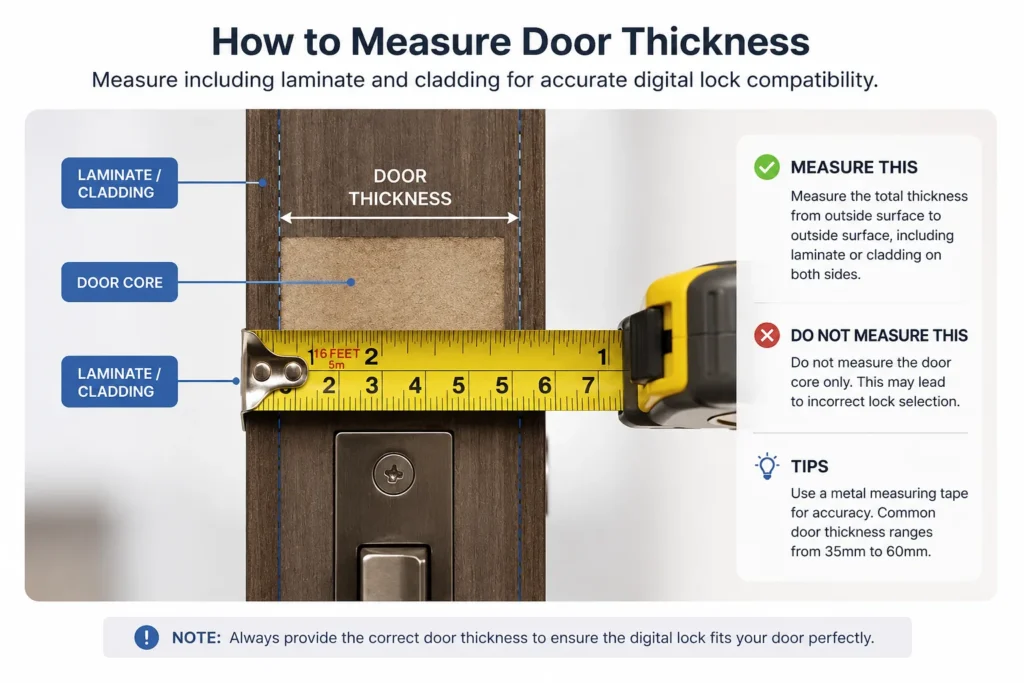
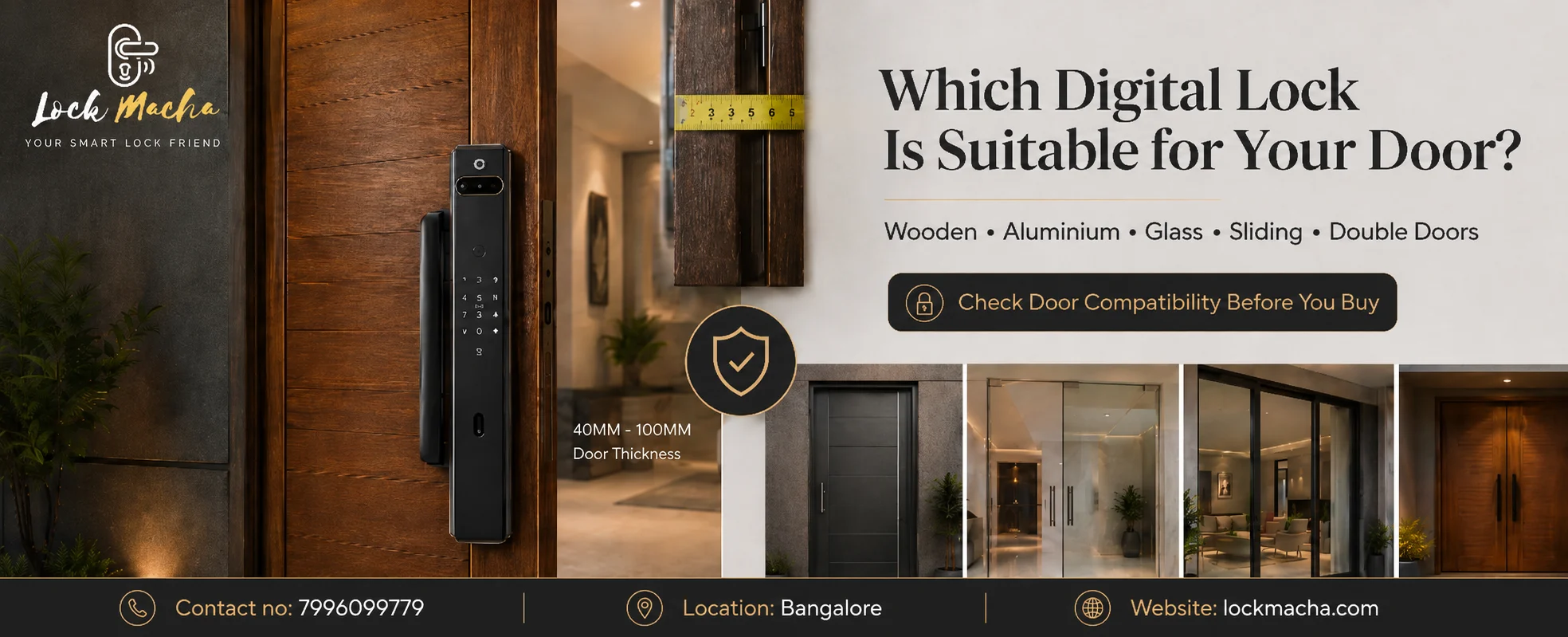
Every digital lock supports a particular door-thickness range. Measure the complete thickness of the door, including laminate, veneer, decorative panels or metal cladding.

3. Available Door Width

There must be sufficient flat space for the front and rear lock panels. Decorative mouldings, grooves or glass panels can reduce the usable installation area.

4. Door-Frame Clearance

The lock bolt must align correctly with the strike plate on the frame. A narrow, uneven or recessed frame may require modification.

5. Backset

The backset is the distance between the edge of the door and the centre of the lock handle, spindle or key cylinder. It determines where the lock body will sit inside the door.

6. Existing Lock Dimensions

Measure the length and width of the existing lock body, handle plate and visible cut-outs. A replacement digital lock should ideally cover the old holes.

7. Left- or Right-Opening Direction

Some locks can be adjusted for either direction, while other models must be configured according to the door handing.

8. Inward- or Outward-Opening Door

The opening direction can affect the lock handle, push-pull operation and strike plate installation.

9. Single or Double Door

A single door locks against a fixed frame. A double door may lock against the second door panel, requiring additional alignment and reinforcement.

10. Main Door or Internal Door

Main doors normally need stronger mortise or deadbolt systems, while internal doors may use simpler rim locks or lever-handle locks.

11. Electrical Requirements

Most residential digital locks are battery-operated. However, some access-control systems, magnetic locks and video-door solutions may require electrical wiring.

12. Wi-Fi or Mobile Connectivity

Smart locks with remote unlocking, app control or video features may need stable Wi-Fi, a compatible mobile application or an additional gateway.

Which Digital Lock Is Suitable for Different Door Materials?

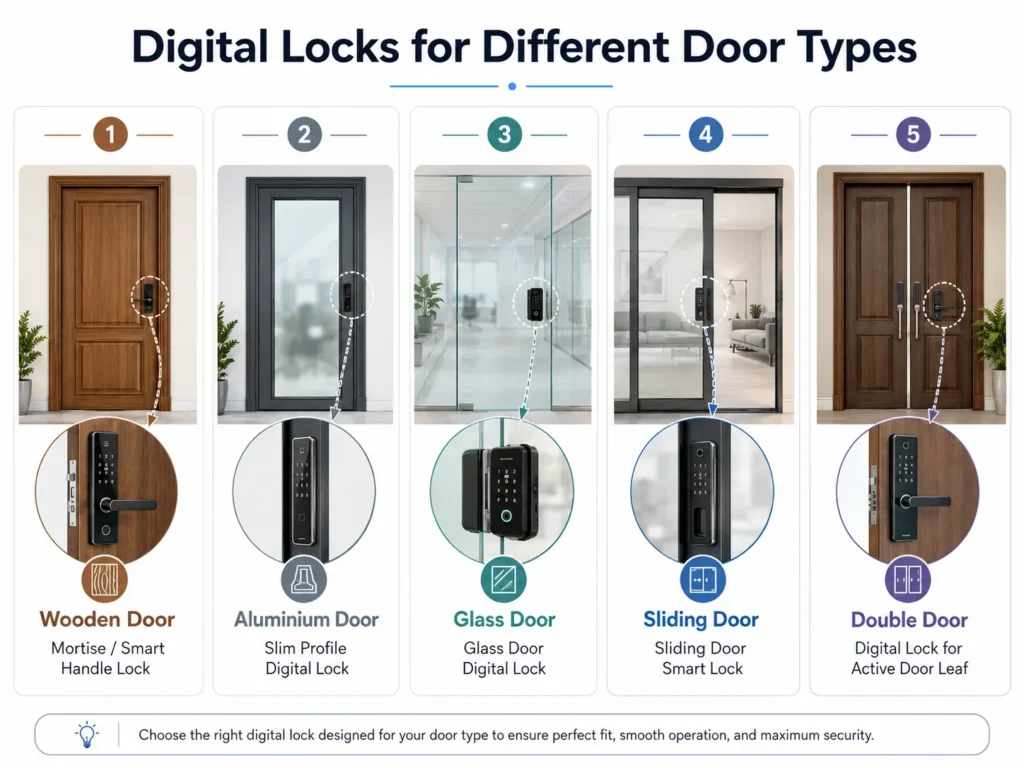
Digital Lock for a Wooden Door

Wooden doors generally offer the widest range of digital lock compatibility.

Solid wooden main doors can commonly support:

  • Mortise digital locks
  • Push-pull digital locks
  • Lever-handle digital locks
  • Deadbolt digital locks
  • Rim digital locks

However, the door’s thickness and internal construction must still be checked.

A hollow-core wooden door may not provide sufficient support for a heavy mortise or push-pull lock. Decorative grooves, mouldings or uneven surfaces can also prevent the lock panel from sitting flat.

When replacing an existing mechanical lock, the old mortise cavity and handle holes must be compared with the new digital lock’s installation template.

A digital lock for a wooden door is commonly suitable when:

  • The door has sufficient thickness
  • The internal wood is strong
  • There is enough flat installation space
  • The frame is aligned
  • The existing cut-outs can be covered or modified safely

Smart Lock for an Aluminium Door

Aluminium doors usually have narrower profiles than wooden doors. Therefore, a standard digital mortise lock may not fit.

A slim-profile smart lock designed for aluminium doors may be required.

One of the most important measurements is the stile width. The stile is the vertical aluminium section at the side of the door where the lock is installed. If this section is too narrow, the lock body or front panel may overlap the glass or extend beyond the profile.

Before choosing a smart lock for an aluminium door, check:

  • Width of the aluminium stile
  • Depth of the aluminium profile
  • Internal channels or reinforcement
  • Glass position
  • Frame clearance
  • Existing lock mechanism
  • Space for the strike plate

Drilling and cutting aluminium should be carried out carefully. Incorrect cutting can weaken the profile or damage the finish.

A site inspection is strongly recommended for aluminium doors, especially when the door has a narrow profile or glass panel.

Glass Door Digital Lock

Glass doors require digital locks specifically designed for glass applications.

A standard mortise lock should not be installed directly into a glass panel. Frameless glass doors commonly require clamp-type digital locks that fit around the glass without conventional mortising.

Before selecting a glass door digital lock, check:

  • Glass thickness
  • Single- or double-door configuration
  • Frameless or aluminium-framed design
  • Position of patch fittings
  • Floor spring location
  • Existing glass handle
  • Clearance between the glass and frame
  • Locking point on the opposite panel or wall

For a double glass door, the locking arrangement may differ because one glass panel may need to lock against the other.

Professional inspection is strongly recommended before confirming a digital lock for glass doors in India.

Digital Lock for a Sliding Door

Sliding doors need a different locking mechanism from swing doors.

A standard swing-door mortise lock usually uses a latch or deadbolt that enters the frame from the side. A sliding door may require a hook bolt or a lock specifically designed to secure the moving panel to the frame.

Before selecting a digital lock for a sliding door, check:

  • Wooden or aluminium construction
  • Sliding direction
  • Available profile width
  • Meeting point between the door and frame
  • Space for a hook-bolt mechanism
  • Door overlap
  • Pocket-door clearance
  • Existing handle and cut-outs

Wooden sliding doors and aluminium sliding doors may require different lock types. Pocket sliding doors can be especially difficult because the door moves inside the wall, leaving limited space for a lock body or handle.

Digital Lock for a Metal or Steel Door

Digital locks can be installed on many metal and steel doors, but the internal structure must be inspected.

Steel doors may contain:

  • Internal reinforcement
  • Welded lock boxes
  • Hollow sections
  • Insulation
  • Fire-resistant material
  • Pre-cut lock openings

An existing welded lock box may limit the size of the new mortise. Cutting and drilling should be done using suitable tools to prevent damage to the door surface.

The lock bolt must also align with the metal frame and strike plate.

Fire-rated doors should not be modified without checking the door manufacturer’s instructions and required approvals. Unauthorised modification can affect the door’s certification and performance.

Digital Lock for a UPVC Door

UPVC doors normally have narrow profiles and internal steel reinforcement. Many also use multipoint locking mechanisms.

Replacing a multipoint system with a standard digital lock can be complicated. A slim smart lock designed for UPVC or narrow-profile doors may be required.

Before confirming the lock, inspect:

  • UPVC profile width
  • Internal metal reinforcement
  • Existing multipoint mechanism
  • Handle position
  • Frame clearance
  • Locking points
  • Door alignment

A site inspection is recommended before choosing a digital lock for a UPVC door.

Why Door Thickness Matters for a Digital Lock

Every digital lock supports a specific door-thickness range.

The lock normally has an external panel and an internal panel connected through the door using screws, a spindle and electronic cables.

If the door is too thin:

  • The lock may not tighten securely
  • The panels may move during operation
  • Additional spacer plates may be required
  • Heavy lock panels may not receive sufficient support

If the door is too thick:

  • The spindle may not reach
  • Connecting screws may be too short
  • Electronic cables may not connect properly
  • The lock body may require extended accessories

How to Measure Door Thickness

digital lock for main door

Open the door and place a measuring tape across the side edge.

Measure from the complete outer surface on one side to the complete outer surface on the other side.

Do not measure only the visible wooden core.

Include:

  • Laminate
  • Veneer
  • Metal sheet
  • Decorative cladding
  • Additional panels
  • Surface coverings

Send the measurement in millimetres for better accuracy.

What Is Backset in a Digital Lock?

Backset is the distance from the edge of the door to the centre of the handle spindle, key cylinder or lock operating point.

It determines how deeply the lock body sits inside the door.

Backset matters because it affects:

  • Handle position
  • Clearance from the door edge
  • Compatibility with existing holes
  • Position of the mortise inside the door
  • Alignment with the frame
  • Strike-plate position

How to Measure Backset

Close the door and locate the centre of the existing handle spindle or key cylinder.

Measure horizontally from the edge of the door to that centre point.

When replacing an existing lock, also measure the mortise body and share clear side-edge photos.

Left-Opening and Right-Opening Doors

Door handing refers to the side on which the hinges are positioned and the direction in which the door opens.

Stand on the outside or entry side of the door.

  • Hinges on the left generally indicate a left-hinged door.
  • Hinges on the right generally indicate a right-hinged door.

You should also mention whether the door opens inward or outward.

For example, a main door with hinges on the right that moves inside the home is a right-hinged, inward-opening door.

Some digital locks are reversible. Others require the handle, latch or push-pull direction to be configured during installation. Sharing a short video of the door opening and closing can help avoid confusion.

Digital Lock for a Single Door vs Double Door

Digital Lock for a Single Door

A digital lock for a single door is generally easier to plan because the lock bolt enters a fixed frame.

Compatibility still depends on:

  • Door thickness
  • Door material
  • Backset
  • Frame clearance
  • Existing cut-outs
  • Opening direction

Digital Lock for a Double Door

A double door has two door panels or leaves. One is normally the active door, while the second remains fixed using flush bolts or another securing system.

The digital lock may need to lock into the second door panel instead of a permanent frame.

Important considerations include:

  • Movement between both door panels
  • Strength of the inactive panel
  • Strike-plate positioning
  • Flush-bolt condition
  • Door alignment
  • Gap between the panels
  • Reinforcement requirements

If the second panel moves, the lock bolt may not align correctly. A site inspection is recommended before selecting a digital lock for a double door.

Can the Existing Lock Cut-Out Be Reused?

The existing lock cut-out plays an important role when replacing a mechanical or older digital lock.

Check:

  • Mortise cavity size
  • Handle holes
  • Key-cylinder holes
  • Screw holes
  • Existing decorative plate
  • Old lock footprint
  • Previous door repairs
  • Damaged or enlarged openings

The new digital lock should ideally cover the old holes. When it does not, the door may require:

  • A cover plate
  • A customised escutcheon
  • Wood filling
  • Polishing or laminate repair
  • Metal fabrication
  • Additional reinforcement

In extreme cases, replacing or professionally rebuilding part of the door may be more practical than making multiple modifications.

Do not remove the existing lock before checking the dimensions of the replacement digital lock.

Door Frame and Strike-Plate Compatibility

A digital lock is not compatible only because its panels fit on the door. Its latch or deadbolt must also align correctly with the strike plate on the frame.

Check:

  • Frame material
  • Frame depth
  • Gap between the door and frame
  • Existing strike plate
  • Double-rebate design
  • Metal frame construction
  • Weather seals
  • Door stoppers
  • Door sagging
  • Uneven closing

Even a correctly selected digital lock can malfunction when the door is misaligned.

Common symptoms include:

  • Door not locking smoothly
  • Motor struggling to operate
  • Bolt hitting the frame
  • Automatic locking failing
  • Door needing to be pushed or pulled during locking

Door alignment should be corrected before or during installation.

Digital Lock Compatibility Table

Door TypeCommon Suitable Lock TypeImportant ChecksInspection Recommended?
Solid wooden doorMortise, push-pull, lever, deadbolt or rim lockThickness, backset, cut-outs and frame alignmentRecommended for replacement locks
Hollow wooden doorLightweight rim, deadbolt or selected mortise lockInternal reinforcement and door strengthYes
Aluminium doorSlim-profile smart lockStile width, profile depth and internal channelsYes
Frameless glass doorClamp-type glass door digital lockGlass thickness, patch fittings and locking pointStrongly recommended
Framed glass doorSlim lock depending on the frame profileFrame width, glass position and clearanceYes
Wooden sliding doorHook-bolt or sliding-door-compatible lockDoor overlap, pocket clearance and frameYes
Aluminium sliding doorSlim hook-bolt digital lockAluminium profile, frame and meeting pointStrongly recommended
Steel doorSelected mortise, lever or deadbolt lockReinforcement, welded box and frame alignmentYes
UPVC doorSlim-profile or UPVC-compatible smart lockMultipoint system and internal reinforcementStrongly recommended
Single doorMortise, deadbolt, rim or push-pull lockFrame, thickness and opening directionDepends on the door
Double doorSelected mortise or suitable digital lock arrangementInactive leaf, alignment and strike supportStrongly recommended

This table provides general guidance. Final compatibility depends on the specific digital lock model and actual door measurements.

digital lock for main door

Send These Three Door Photos for a Compatibility Check

Before purchasing a lock, send Lock Macha these three clear photos:

1. Front Photo of the Complete Door

Take the photo from a distance so the full door, frame, hinges and existing handle are visible.

2. Side-Edge Photo

Open the door and photograph the side edge. The image should clearly show the existing mortise, latch, bolt and door thickness.

3. Close-Up of the Existing Lock and Frame

Take a close photo showing the handle, lock plate, key cylinder, door edge and strike plate.

For a more accurate compatibility check, also send:

  • Door thickness in millimetres
  • Door material
  • Inside and outside photos
  • Opening direction
  • Installation city
  • Short door-opening video
  • Existing lock brand or model, if known
  • Preferred features such as fingerprint, PIN, RFID, mobile app, camera or remote access

When Is a Site Inspection Required?

A site inspection is recommended when:

  • The door is aluminium, glass, UPVC, steel or sliding
  • The door has a narrow or unusual profile
  • It is a double door
  • The existing cut-outs are large
  • A push-pull lock is required
  • The frame is narrow, recessed or uneven
  • The door has decorative moulding
  • The door is fire-rated
  • Electrical wiring is required
  • The lock must connect to access control
  • Measurements are unclear
  • Multiple doors are involved
  • The property is under construction
  • The door is expensive or customised

A site inspection helps identify installation limitations before the door is modified.

Common Digital Lock Compatibility Mistakes

Avoid these common mistakes:

  • Buying a lock based only on appearance
  • Choosing only according to price
  • Assuming every digital lock fits every door
  • Not checking door thickness
  • Ignoring backset
  • Not checking the opening direction
  • Removing the old lock before selecting the replacement
  • Ignoring the frame and strike plate
  • Selecting a wide lock for a narrow aluminium profile
  • Installing a standard mortise lock on glass
  • Using an inexperienced installer
  • Ignoring after-sales and installation support
  • Not checking whether old holes will remain visible
  • Buying before sharing measurements and photos

How Lock Macha Helps You Select the Right Digital Lock

Lock Macha helps customers understand whether a digital lock may be suitable for their door before installation.

Our compatibility support can include:

  • Reviewing door photos
  • Checking door measurements
  • Identifying the door material
  • Understanding the opening direction
  • Checking the available installation area
  • Reviewing existing lock cut-outs
  • Suggesting suitable digital lock categories
  • Advising when a site inspection is needed
  • Coordinating professional installation support
  • Providing after-sales guidance

We provide compatibility guidance for wooden, aluminium, glass, steel, UPVC, sliding, single and double doors.

Final model selection should always be confirmed after reviewing the actual door and the installation requirements of the selected lock.

Frequently Asked Questions

1. Can a digital lock be installed on any door?

No. Digital lock compatibility depends on the door material, thickness, construction, opening direction, frame and available installation space. Wooden doors generally offer more options, while aluminium, glass, sliding and UPVC doors may need specialised locks. Door photos and measurements should be checked before purchasing.

2. What door thickness is required for a digital lock?

The required thickness varies by lock model. Many digital locks are designed for a specific thickness range and may need different screws, spindles or accessories for thicker doors. Measure the complete door, including laminate, cladding and decorative panels, before confirming the lock.

3. Which digital lock is best for a wooden main door?

The suitable digital lock for a wooden main door depends on the door thickness, strength, backset and existing cut-outs. Solid wooden doors can commonly support mortise, lever-handle, push-pull, deadbolt and rim locks. The final model should be selected after checking measurements.

4. Can a digital lock be installed on an aluminium door?

Yes, but the aluminium profile must have sufficient width and depth. A standard mortise lock may be too wide, so a slim-profile smart lock may be necessary. The stile width, internal reinforcement, glass position and frame clearance should be inspected before installation.

5. Can digital locks be installed on glass doors?

Yes, using digital locks specifically designed for glass doors. Frameless glass doors commonly use clamp-type locks. Glass thickness, patch fittings, floor springs and the opposite locking surface must be checked. Standard wooden-door mortise locks should not be installed directly into glass.

6. Is a digital lock suitable for a sliding door?

A digital lock can be installed on many sliding doors, but it should have a sliding-door-compatible mechanism such as a hook bolt. Standard swing-door locks may not work. Compatibility depends on the material, available profile width, door overlap and frame arrangement.

7. Can a new digital lock use the existing lock cut-out?

It may be possible when the new lock dimensions match or cover the existing cut-out. If the openings do not align, a cover plate, wood filling, polishing or fabrication may be required. Do not remove the existing lock until the replacement model has been checked.

8. How do I know whether my door is left-opening or right-opening?

Stand on the outside of the door and look at the hinges. Hinges on the left generally mean a left-hinged door, while hinges on the right indicate a right-hinged door. Also mention whether the door opens inward or outward. A short video is useful for confirmation.

9. Can a digital lock be installed on a double door?

Yes, but double doors need careful inspection. The active door normally locks against the inactive door panel, which must be firmly secured. Movement between the two panels can cause alignment problems. The strike plate and flush bolts may also require reinforcement or adjustment.

10. Is a site inspection necessary before buying a digital lock?

A site inspection may not be required for every standard wooden door. However, it is strongly recommended for aluminium, glass, sliding, steel, UPVC, double, fire-rated or customised doors. Inspection is also useful when the existing cut-outs are large or measurements are unclear.

11. Can a digital lock be installed without damaging the door?

Digital lock installation normally requires drilling and cutting, particularly for mortise models. When the correct lock is selected and installed professionally, modification can be planned carefully. Existing holes, decorative finishes and internal construction should be inspected before work begins.

12. What photos should I send for a compatibility check?

Send a complete front photo of the door, a side-edge photo showing the door thickness and mortise, and a close-up of the existing lock and frame. Also share inside and outside photos, measurements, opening direction, installation city and a short video of the door operating.

Need Help Choosing a Digital Lock for Your Main Door?

The right digital lock should match your preferred access features as well as your door’s physical construction.

Before purchasing, check:

  • Door material
  • Door thickness
  • Door opening direction
  • Existing lock size
  • Backset
  • Frame clearance
  • Single- or double-door design
  • Installation location

Send us three door photos—front, side and existing lock—to check compatibility.

Also share your door thickness, door material, opening direction, installation city and preferred features such as fingerprint, PIN, RFID, mobile app, camera or remote access.

WhatsApp Enquiry Message

Not sure which digital lock will fit your door? Send Lock Macha three clear door photos and basic measurements. Our team will review the door type, thickness, frame, opening direction and existing lock before recommending a suitable option.

Choose the Right Digital Lock Before Modifying Your Door

Selecting the right digital lock for your main door is not only about choosing fingerprint access, PIN entry, RFID, a mobile app or a premium design. The lock must also match your door’s material, thickness, opening direction, backset, frame and existing lock cut-outs.

Checking compatibility before purchasing can help you avoid installation delays, unnecessary cutting, additional modification costs and damage to your door. This is especially important for aluminium, glass, sliding, steel, UPVC and double doors, where specialised digital lock models or a site inspection may be required.

Not sure which digital lock will fit your door?

Send Lock Macha three clear door photos—front view, side edge and existing lock—to check compatibility.

For a more accurate recommendation, also share:

  • Door thickness
  • Door material
  • Left- or right-opening direction
  • Inward- or outward-opening direction
  • Installation city
  • Preferred features such as fingerprint, PIN, RFID, camera or mobile access

Our team will review your door type, frame, measurements and existing lock arrangement before suggesting a suitable digital lock category and installation approach.

Send your door photos and measurements to Lock Macha today and choose your digital lock with greater clarity and confidence.


Location : 235/E, Bommasandra Industrial Area, Bengaluru, Karnataka 560099

Contact 917996099779
Back to Top
Product has been added to your cart
Compare (0)